Are you struggling to rank your Google My Business (GMB) listing on Google? If so, you’re not alone. Many businesses face challenges when it comes to improving their GMB ranking and gaining visibility in local search results. In this article, we will provide you with 10 helpful tips to start improving your GMB ranking and increasing your chances of being found by local customers. From optimizing your GMB listing to leveraging local content strategies, we’ll cover key tactics that can make a significant impact on your local SEO efforts. So, let’s dive in and unlock the secrets to boosting your GMB ranking!
Improving GMB Ranking: Not Ranking on Google My Business
Are you struggling to rank on Google My Business (GMB)? Don’t worry, you’re not alone. Many local businesses face the challenge of not ranking well on GMB, which can significantly impact their online visibility and customer reach. In this article, we will explore the importance of GMB ranking, common reasons for not ranking on GMB, the impact of GMB ranking on local SEO, and best practices to improve your GMB listing. By following these tips, you can enhance your online presence and increase your chances of ranking higher on GMB.

Understanding the Importance of Google My Business Ranking
GMB ranking plays a vital role for local businesses. When potential customers search for products or services in their local area, they often turn to Google for recommendations. GMB ranking determines whether your business appears in the local search results, also known as the Local Pack or Map Pack. Being listed in these prominent positions can significantly increase your visibility and attract more potential customers.
Moreover, GMB ranking helps establish trust with your target audience. When your business appears in the search results with a high ranking, it gives customers the impression that your business is reputable and reliable. This trust factor can make them more likely to choose your business over competitors.
Additionally, ranking higher on GMB can drive more local traffic to your website and physical location. By optimizing your GMB listing, you can increase your chances of being found by customers in your local area. This can lead to more website visits, phone calls, and foot traffic, ultimately resulting in higher conversions and revenue for your business.
Common Reasons for Not Ranking on Google My Business
There are several factors that could be hindering your GMB ranking. It’s essential to identify and address these issues to improve your chances of ranking higher on GMB. Some common reasons for not ranking on GMB include:
1. Incomplete or Inaccurate Business Information
Providing complete and accurate business information is crucial for GMB ranking. Ensure that your business name, address, and phone number (NAP) are consistent across all platforms. Incomplete or inconsistent information can confuse search engines and prevent your business from ranking well.
2. Lack of Regular Updates and Activity
Google considers the activity level of your GMB listing when determining rankings. If you haven’t updated your GMB listing in a while or have low engagement with customers through features like reviews and posts, it can affect your ranking. Regularly update your listing and encourage customer interactions to improve your GMB ranking.
3. Inconsistent NAP (Name, Address, Phone)
Having inconsistent NAP information across various online directories and platforms can confuse search engines and negatively impact your GMB ranking. Make sure your NAP is consistent across all platforms, including your website, GMB listing, and other online directories.
4. Negative Customer Reviews or Ratings
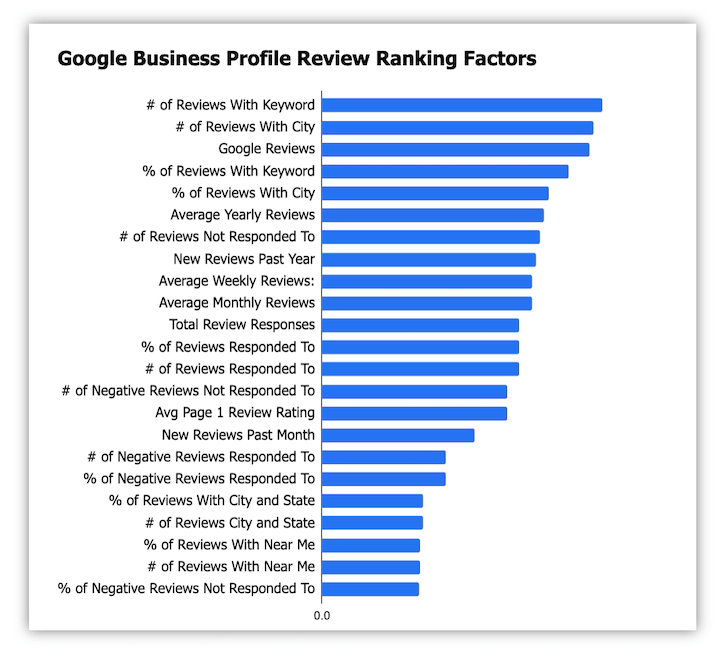
Negative customer reviews and low ratings can harm your GMB ranking. Encourage satisfied customers to leave positive reviews and address any negative feedback promptly and professionally. Having a high number of positive reviews can improve your GMB ranking and attract more customers.
5. Low Engagement and Interaction
Engagement and interaction with customers on your GMB listing are essential for ranking well. Responding to reviews, answering customer questions, and posting regular updates can enhance customer engagement and improve your GMB ranking.
The Impact of GMB Ranking on Local SEO
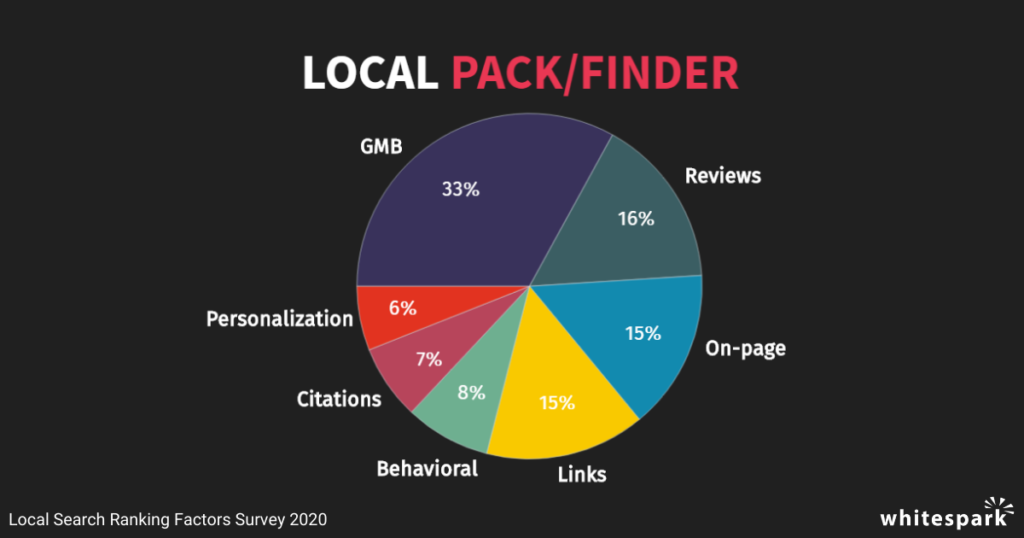
GMB ranking has a significant impact on local SEO. When your business ranks higher on GMB, it increases your chances of appearing in the Local Pack or Map Pack, which are prime real estate in the search results. This increased visibility can lead to higher organic traffic, better brand recognition, and increased customer trust.
Google’s Local Pack and Map Pack algorithm determine which businesses appear in the top search results for local queries. Optimizing your GMB listing can improve your chances of ranking in these positions, boosting your local SEO efforts. Therefore, it’s crucial to focus on improving your GMB ranking to enhance your overall local SEO strategy.
Moreover, a higher GMB ranking has a positive impact on your organic visibility and ranking. When your business ranks well on GMB, it sends signals to search engines that your business is credible and relevant to local searches. This can result in better organic rankings for relevant search queries, leading to increased website visibility and traffic.
The Role of Local SEO in GMB Ranking
Optimizing your GMB listing is an integral part of your overall local SEO strategy. By implementing local SEO best practices, you can improve your GMB ranking and boost your online presence. Here are some key factors to consider:
1. Optimizing On-Page Factors for Local SEO
Ensure that your website is optimized for local SEO by including relevant location-based keywords in your page titles, meta descriptions, headings, and content. Additionally, optimize your website’s URL structure, schema markup, and internal linking to improve local SEO.
2. Building Local Citations for GMB
Local citations are online mentions of your business’s NAP information on various directories and platforms. Building consistent and high-quality citations can improve your GMB ranking. Create listings on reputable directories and ensure that your NAP information is accurate and consistent across all platforms.
3. Creating Locally Optimized Content
Developing locally optimized content can help improve your GMB ranking. Create blog posts, articles, and landing pages that target local keywords and provide valuable information to your target audience. Local content can improve your website’s visibility in local search results and attract more relevant traffic.
4. Implementing Structured Data Markup
Implementing structured data markup, such as Schema.org, can enhance your GMB ranking. Structured data provides search engines with additional information about your business, such as business hours, reviews, and ratings. This can increase the visibility and relevance of your GMB listing.
5. Getting High-Quality Backlinks from Local Websites
Earning high-quality backlinks from local websites can boost your GMB ranking. Seek opportunities to collaborate with local businesses, sponsor local events, or contribute guest posts to local publications. These backlinks signal to search engines that your business is authoritative and relevant to local searches.
Auditing and Analyzing GMB Listing
To improve your GMB ranking, it’s essential to audit and analyze your GMB listing regularly. This process will help you identify any issues or areas for improvement. Here are some steps to follow when auditing and analyzing your GMB listing:
1. Conducting a Comprehensive GMB Listing Audit
Start by auditing your GMB listing to ensure that all information is accurate and up to date. Check your business name, address, phone number, website URL, categories, and attributes. Make any necessary updates or corrections to ensure consistency and accuracy.
2. Assessing Business Information Accuracy
Verify that your business information is correct and consistent across all platforms. This includes your website, social media profiles, online directories, and GMB listing. Consistency in NAP information is crucial for GMB ranking.
3. Evaluating Image and Video Content
Review your GMB listing’s visual content, such as images and videos. Ensure that the images accurately represent your business and are of high quality. Consider updating or adding new images and videos to enhance your GMB listing.
4. Reviewing Customer Reviews and Ratings
Analyze your customer reviews and ratings on your GMB listing. Address any negative reviews promptly and professionally. Encourage satisfied customers to leave positive reviews to improve your GMB ranking.
5. Analyzing GMB Insights and Performance Metrics
Utilize the insights and performance metrics provided by GMB to understand how your listing is performing. Monitor metrics such as views, searches, website clicks, phone calls, and direction requests. Analyzing these metrics can help you identify areas for improvement and measure the effectiveness of your optimization efforts.
Optimizing GMB Listing: Best Practices
Optimizing your GMB listing is vital to improve your GMB ranking. By following these best practices, you can enhance your chances of ranking higher on GMB:
1. Ensuring Accurate and Consistent Business Information
Double-check that your business name, address, phone number, and website URL are accurate and consistent. Consistency is key for GMB ranking. Make sure your information matches what is listed on your website and other online directories.
2. Selecting Relevant Categories and Attributes
Choose the most relevant primary category for your business on GMB. Selecting accurate categories and attributes helps Google understand your business and improves the chances of ranking for relevant searches. Include additional subcategories if applicable.
3. Optimizing Business Description and Services
Craft a compelling and informative business description that highlights your unique selling points and the services or products you offer. Incorporate relevant keywords naturally within the description to improve your GMB ranking.
4. Uploading High-Quality Photos and Videos
Upload high-quality photos and videos that accurately represent your business. Use professional images of your storefront, products, services, and team members. Visual content can significantly impact your GMB ranking and attract more customers.
5. Encouraging Positive Customer Reviews and Ratings
Encourage satisfied customers to leave reviews on your GMB listing. Respond to reviews, both positive and negative, promptly and professionally. Positive reviews and high ratings can improve your GMB ranking and attract more customers.
6. Responding to Reviews and Engaging with Customers
Engage with your customers by responding to their reviews and questions on your GMB listing. This interaction demonstrates your commitment to customer satisfaction and can boost your GMB ranking.

Utilizing GMB Posts for Local SEO
GMB posts are an excellent feature for optimizing your GMB listing and improving your local SEO. By utilizing GMB posts effectively, you can enhance your online visibility and attract more customers. Here are some tips for using GMB posts for local SEO:
1. Understanding the Benefits of GMB Posts
GMB posts provide an opportunity to share timely updates, promotions, events, and relevant content with your audience. These posts can appear in Google search results and increase your chances of attracting potential customers.
2. Creating Engaging and Informative Posts
Craft engaging and informative posts that capture the attention of your audience. Use eye-catching images, compelling headlines, and concise, relevant content. Keep your posts informative and avoid overly promotional language.
3. Using Relevant Keywords and Localized Content
Incorporate relevant keywords into your GMB posts to improve your local SEO. Consider localizing your content by mentioning specific locations or targeting local events and news. This can make your posts more relevant to local search queries.
4. Promoting Events, Offers, and Updates
Take advantage of GMB posts to promote any upcoming events, offers, or updates related to your business. Use this opportunity to drive more traffic to your website or physical location by providing a clear call to action in your posts.
5. Monitoring Post Performance and Analytics
Regularly monitor the performance of your GMB posts to gauge their effectiveness. Pay attention to metrics such as views, clicks, and engagement. This will help you understand what types of posts resonate with your audience and improve your local SEO efforts.
Leveraging Google My Business Categories
Selecting the most relevant Google My Business (GMB) categories is crucial for optimizing your GMB listing and improving your local visibility. By choosing appropriate categories, you can increase your chances of ranking higher in local search results. Here are some tips for leveraging GMB categories effectively:
1. Choosing the Most Relevant Primary Category
Select the primary category that best describes your business. Choose the category that aligns closely with your products or services. This primary category carries the most weight in determining your GMB ranking.
2. Adding Subcategories for Additional Visibility
Consider adding subcategories to provide more context about your business. Subcategories help Google understand the specific services or products you offer. Use subcategories to enhance your GMB ranking and improve your local visibility.
3. Researching Competitor Categories
Research the categories used by your competitors who are ranking well on GMB. Understanding what categories your competitors are using can give you insights into how you can improve your own GMB ranking. However, avoid spamming categories and only select ones that genuinely apply to your business.
4. Avoiding Category Spamming and Misrepresentation
Selecting irrelevant or spammy categories can harm your GMB ranking. Be honest and accurate when choosing categories for your business. Attempting to misrepresent your business through misleading categories can result in penalties and loss of visibility.
5. Testing and Experimenting with Category Changes
If you’re not seeing the desired results with your current categories, don’t be afraid to test and experiment with different options. Assess the impact of category changes on your GMB ranking and adjust accordingly. Keep track of any improvements or changes in local visibility.
Managing and Monitoring Google My Business
Managing and monitoring your Google My Business (GMB) listing is essential for maintaining your online presence and improving your GMB ranking. Here are some key practices to follow:
1. Update Business Information Regularly
Ensure that your GMB listing is up to date by regularly updating your business information. This includes your business name, address, phone number, business hours, website URL, and services offered. Keeping your information accurate and consistent improves your GMB ranking.
2. Respond to Customer Reviews
Responding to customer reviews is an essential aspect of managing your GMB listing. Engage with customers by thanking them for positive reviews and addressing any concerns in negative reviews. This shows potential customers that you value their feedback and are dedicated to excellent customer service.
3. Monitor and Analyze Performance Metrics
Regularly monitor the performance metrics of your GMB listing through GMB Insights. Keep an eye on metrics such as views, clicks, phone calls, and direction requests. Analyzing these metrics will help you understand how customers are interacting with your listing and optimize accordingly.
4. Post Regular Updates and Content
Regularly post updates, offers, and informative content on your GMB listing. This helps to keep your audience engaged and shows Google that your business is active. Leverage various features such as posts, photos, videos, and Q&A sections to enhance your GMB ranking.
5. Use GMB Messaging and Online Booking
Consider enabling GMB messaging and online booking features if applicable to your business. These features allow customers to communicate with your business directly and make appointments or reservations. Utilizing these features can improve customer engagement and contribute to your GMB ranking.
Measuring GMB Performance with Analytics
Measuring the performance of your Google My Business (GMB) listing is crucial for evaluating the effectiveness of your optimization efforts and identifying areas for improvement. By analyzing GMB insights and metrics, you can make informed decisions to enhance your GMB ranking. Here are some key aspects to consider:
1. Understanding GMB Insights and Metrics
GMB Insights provides valuable data and metrics about how customers are finding and interacting with your listing. This includes details such as the number of views, search queries, clicks, calls, and direction requests your listing receives. Understanding these insights is essential for improving your GMB ranking.
2. Monitoring Views, Searches, and Actions
Keep track of the number of views, searches, and actions related to your GMB listing. This data gives you insights into how often your listing is being seen, the queries that drive traffic to your listing, and the actions customers take after viewing your listing. Analyzing these metrics helps you identify trends and areas for improvement.
3. Analyzing Website Clicks and Phone Calls
Measure the number of clicks on your website URL and phone calls made from your GMB listing. This data provides insights into how effective your listing is at driving traffic to your website and generating phone calls. By analyzing click and call metrics, you can optimize your GMB listing to encourage more engagement.
4. Tracking Directions and Click-to-Call
Monitor the number of direction requests and click-to-call actions made from your GMB listing. This data indicates customer intent and interest in visiting your business. By understanding direction and click-to-call metrics, you can make informed decisions about your GMB optimization strategy.
5. Benchmarking GMB Performance and Setting Goals
Compare your GMB performance to industry benchmarks and set goals for improvement. Benchmarking your performance against competitors or industry standards provides context and helps you identify areas where you may be falling behind. Setting specific goals enables you to measure progress and focus your efforts on improving your GMB ranking.
In conclusion, ranking well on Google My Business (GMB) is crucial for local businesses looking to improve their online visibility and attract more customers. Understanding the importance of GMB ranking, common reasons for not ranking on GMB, the impact on local SEO, and effective optimization practices will allow you to improve your GMB listing and increase your chances of ranking higher on Google. By following these strategies and monitoring your GMB performance, you can boost your online presence, attract more local traffic, and grow your business.